FftSpatialFilter2d
This module filters a 2d image using its FFT magnitude. @BR It is useful for removing periodic noise from an image because periodic objects can be easily extracted in frequency space.
Access to parameter description
The steps of the FFT Filter algorithm are:
The input is copied into a square image. The FFT magnitude will also be a square.
The FFT of the squared input is computed.
The filter is applied on the FFT magnitude.
If needed, the inverse FFT is computed from the filtered FFT magnitude and the original FFT phase.
The result is output with its original size.
Two types of filter are available:
The Periodic Structure Filter: removes periodic structures based on their size.
The Stripe Filter: removes stripes, for example, curtaining effects.
Let's consider Figure 1. We want to remove the noise in this image. This noise can be considered a periodic structure, which can be removed using the Periodic Structure Filter.
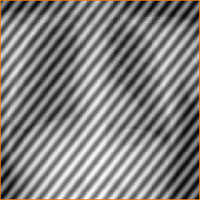
Figure 1: A noisy image
If we choose to remove the structures sized between 4 and 10 pixels, Figure 2 shows the result of the FFT Filter.
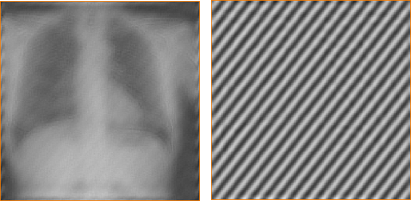
Figure 2: The result of the Periodic Filter: (1) Remove - (2) Keep (the noise is isolated)
The noise in Figure 1 can also be considered as stripes. The angle of the stripes is about 50 degrees. The result of the FFT Filter is given in Figure 3.
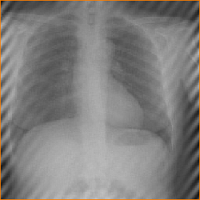
Figure 3: A noisy image
See also
Access to parameter description
The steps of the FFT Filter algorithm are:
The input is copied into a square image. The FFT magnitude will also be a square.
The FFT of the squared input is computed.
The filter is applied on the FFT magnitude.
If needed, the inverse FFT is computed from the filtered FFT magnitude and the original FFT phase.
The result is output with its original size.
Two types of filter are available:
The Periodic Structure Filter: removes periodic structures based on their size.
The Stripe Filter: removes stripes, for example, curtaining effects.
Periodic Structure Filter
Let's consider Figure 1. We want to remove the noise in this image. This noise can be considered a periodic structure, which can be removed using the Periodic Structure Filter.
Figure 1: A noisy image
If we choose to remove the structures sized between 4 and 10 pixels, Figure 2 shows the result of the FFT Filter.
Figure 2: The result of the Periodic Filter: (1) Remove - (2) Keep (the noise is isolated)
Remove Stripes
The noise in Figure 1 can also be considered as stripes. The angle of the stripes is about 50 degrees. The result of the FFT Filter is given in Figure 3.
Figure 3: A noisy image
See also
Function Syntax
This function returns outputImage.
// Function prototype
std::shared_ptr< iolink::ImageView >
fftSpatialFilter2d( std::shared_ptr< iolink::ImageView > inputImage,
                    FftSpatialFilter2d::FilterType filterType,
                    bool removeStructures,
                    const iolink::Vector2d& structureSize,
                    uint32_t stripeOrientationAngle,
                    uint32_t stripeOrientationTolerance,
                    std::shared_ptr< iolink::ImageView > outputImage = nullptr );
This function returns outputImage.
// Function prototype.
fft_spatial_filter_2d(input_image: idt.ImageType,
                      filter_type: Union[Literal["PERIODIC_STRUCTURES"],Literal["STRIPES_REMOVAL"],Literal["BOTH"],FftSpatialFilter2d.FilterType] = FftSpatialFilter2d.FilterType.PERIODIC_STRUCTURES,
                      remove_structures: bool = True,
                      structure_size: Union[Iterable[int], Iterable[float]] = [1, 50],
                      stripe_orientation_angle: int = 0,
                      stripe_orientation_tolerance: int = 10,
                      output_image: idt.ImageType = None) -> idt.ImageType
This function returns outputImage.
// Function prototype.
public static IOLink.ImageView
FftSpatialFilter2d( IOLink.ImageView inputImage,
                    FftSpatialFilter2d.FilterType filterType = ImageDev.FftSpatialFilter2d.FilterType.PERIODIC_STRUCTURES,
                    bool removeStructures = true,
                    double[] structureSize = null,
                    UInt32 stripeOrientationAngle = 0,
                    UInt32 stripeOrientationTolerance = 10,
                    IOLink.ImageView outputImage = null );
Class Syntax
Parameters
| Parameter Name | Description | Type | Supported Values | Default Value | |||||||
|---|---|---|---|---|---|---|---|---|---|---|---|
 |
inputImage |
The input image. | Image | Grayscale or Multispectral | nullptr | ||||||
|
filterType |
The type of filter used.
|
Enumeration | PERIODIC_STRUCTURES | |||||||
|
removeStructures |
If true, only the structures with a size between the values given by Structure Size parameter will be removed. If false, only the structures with a size between the values given by Structure Size parameter will be kept. |
Bool | true | |||||||
|
structureSize |
Specify the structure size values for the periodic filter. | Vector2d | >=0.1 | {1.f, 50.f} | ||||||
|
stripeOrientationAngle |
Specify the direction of the stripes to remove. | UInt32 | <=180 | 0 | ||||||
|
stripeOrientationTolerance |
Set the tolerance of the stripes filter. The larger the value, the more the stripes will be filtered. | UInt32 | <=90 | 10 | ||||||
 |
outputImage |
The output image. The output image characteristics are forced to the same as the input image. | Image | nullptr | |||||||
| Parameter Name | Description | Type | Supported Values | Default Value | |||||||
|---|---|---|---|---|---|---|---|---|---|---|---|
|
input_image |
The input image. | image | Grayscale or Multispectral | None | ||||||
|
filter_type |
The type of filter used.
|
enumeration | PERIODIC_STRUCTURES | |||||||
|
remove_structures |
If true, only the structures with a size between the values given by Structure Size parameter will be removed. If false, only the structures with a size between the values given by Structure Size parameter will be kept. |
bool | True | |||||||
|
structure_size |
Specify the structure size values for the periodic filter. | vector2d | >=0.1 | [1, 50] | ||||||
|
stripe_orientation_angle |
Specify the direction of the stripes to remove. | uint32 | <=180 | 0 | ||||||
|
stripe_orientation_tolerance |
Set the tolerance of the stripes filter. The larger the value, the more the stripes will be filtered. | uint32 | <=90 | 10 | ||||||
|
output_image |
The output image. The output image characteristics are forced to the same as the input image. | image | None | |||||||
| Parameter Name | Description | Type | Supported Values | Default Value | |||||||
|---|---|---|---|---|---|---|---|---|---|---|---|
|
inputImage |
The input image. | Image | Grayscale or Multispectral | null | ||||||
|
filterType |
The type of filter used.
|
Enumeration | PERIODIC_STRUCTURES | |||||||
|
removeStructures |
If true, only the structures with a size between the values given by Structure Size parameter will be removed. If false, only the structures with a size between the values given by Structure Size parameter will be kept. |
Bool | true | |||||||
|
structureSize |
Specify the structure size values for the periodic filter. | Vector2d | >=0.1 | {1f, 50f} | ||||||
|
stripeOrientationAngle |
Specify the direction of the stripes to remove. | UInt32 | <=180 | 0 | ||||||
|
stripeOrientationTolerance |
Set the tolerance of the stripes filter. The larger the value, the more the stripes will be filtered. | UInt32 | <=90 | 10 | ||||||
|
outputImage |
The output image. The output image characteristics are forced to the same as the input image. | Image | null | |||||||
Object Examples
auto polystyrene = ioformat::readImage( std::string( IMAGEDEVDATA_IMAGES_FOLDER ) + "polystyrene.tif" );

FftSpatialFilter2d fftSpatialFilter2dAlgo;
fftSpatialFilter2dAlgo.setInputImage( polystyrene );
fftSpatialFilter2dAlgo.setFilterType( FftSpatialFilter2d::FilterType::BOTH );
fftSpatialFilter2dAlgo.setRemoveStructures( true );
fftSpatialFilter2dAlgo.setStructureSize( {1, 50} );
fftSpatialFilter2dAlgo.setStripeOrientationAngle( 0 );
fftSpatialFilter2dAlgo.setStripeOrientationTolerance( 10 );
fftSpatialFilter2dAlgo.execute();

std::cout << "outputImage:" << fftSpatialFilter2dAlgo.outputImage()->toString();
polystyrene = ioformat.read_image(imagedev_data.get_image_path("polystyrene.tif"))

fft_spatial_filter_2d_algo = imagedev.FftSpatialFilter2d()
fft_spatial_filter_2d_algo.input_image = polystyrene
fft_spatial_filter_2d_algo.filter_type = imagedev.FftSpatialFilter2d.BOTH
fft_spatial_filter_2d_algo.remove_structures = True
fft_spatial_filter_2d_algo.structure_size = [1, 50]
fft_spatial_filter_2d_algo.stripe_orientation_angle = 0
fft_spatial_filter_2d_algo.stripe_orientation_tolerance = 10
fft_spatial_filter_2d_algo.execute()

print("output_image:", str(fft_spatial_filter_2d_algo.output_image))
ImageView polystyrene = ViewIO.ReadImage( @"Data/images/polystyrene.tif" );

FftSpatialFilter2d fftSpatialFilter2dAlgo = new FftSpatialFilter2d
{
    inputImage = polystyrene,
    filterType = FftSpatialFilter2d.FilterType.BOTH,
    removeStructures = true,
    structureSize = new double[]{1, 50},
    stripeOrientationAngle = 0,
    stripeOrientationTolerance = 10
};
fftSpatialFilter2dAlgo.Execute();

Console.WriteLine( "outputImage:" + fftSpatialFilter2dAlgo.outputImage.ToString() );
Function Examples
auto polystyrene = ioformat::readImage( std::string( IMAGEDEVDATA_IMAGES_FOLDER ) + "polystyrene.tif" );

auto result = fftSpatialFilter2d( polystyrene, FftSpatialFilter2d::FilterType::BOTH, true, {1, 50}, 0, 10 );

std::cout << "outputImage:" << result->toString();
polystyrene = ioformat.read_image(imagedev_data.get_image_path("polystyrene.tif"))

result = imagedev.fft_spatial_filter_2d(polystyrene, imagedev.FftSpatialFilter2d.BOTH, True, [1, 50], 0, 10)

print("output_image:", str(result))
ImageView polystyrene = ViewIO.ReadImage( @"Data/images/polystyrene.tif" );

IOLink.ImageView result = Processing.FftSpatialFilter2d( polystyrene, FftSpatialFilter2d.FilterType.BOTH, true, new double[]{1, 50}, 0, 10 );

Console.WriteLine( "outputImage:" + result.ToString() );
© 2026 Thermo Fisher Scientific Inc. All rights reserved.